
Open Graph: qué es y cómo usarlo en tu sitio
Por Tiago CostaActualizado el 2 de julio de 2026

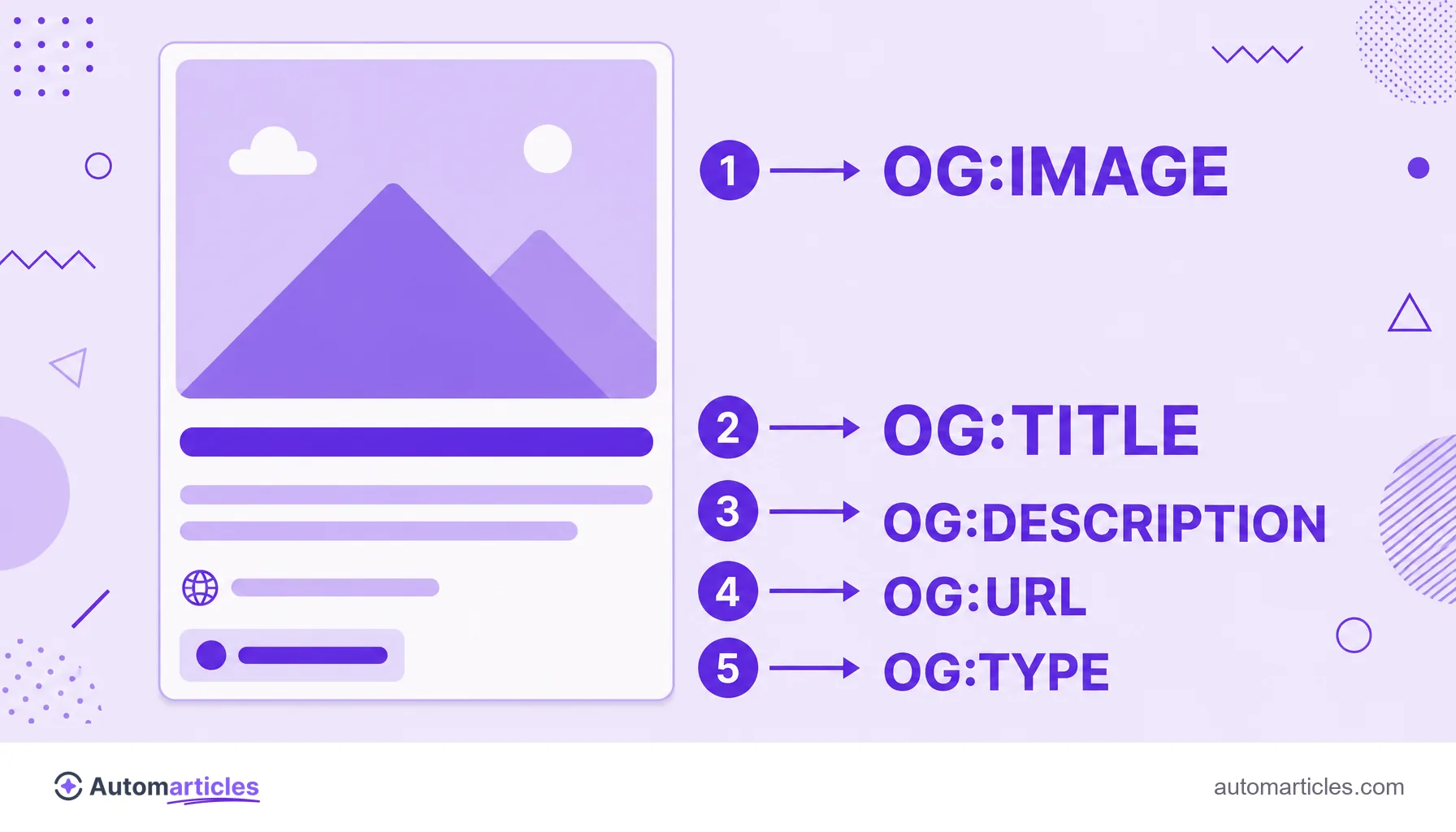
Open Graph es un conjunto de metatags que define cómo aparece tu enlace al compartirse en las redes sociales. Las principales son:
- og:title, el título de la tarjeta;
- og:description, la descripción corta;
- og:image, la imagen de vista previa;
- og:url y og:type, la dirección y el tipo de contenido.
Qué es el Open Graph
El Open Graph es un protocolo creado por Facebook en 2010 para estandarizar cómo se presentan las páginas web cuando se comparten en las redes. Antes de él, cada plataforma adivinaba a su manera qué mostrar de un enlace, y el resultado era impredecible.
En la práctica, el Open Graph es un grupo de meta tags que están en el encabezado (head) del HTML de la página. No aparecen para quien lee el contenido, pero las redes sociales las leen para montar la tarjeta de vista previa con título, descripción e imagen. Todas siguen el prefijo og:, de Open Graph.
Cómo funciona el Open Graph: las principales tags
El protocolo tiene unas pocas tags esenciales. Con ellas, controlas cada parte de la tarjeta que va a aparecer en el feed:
| Tag | Función |
|---|---|
| og:title | Define el título mostrado en la tarjeta, que puede ser distinto de la title tag de la página. |
| og:description | La descripción corta de la tarjeta, en el espíritu de una meta description. |
| og:image | La imagen de vista previa, el elemento que más llama la atención en el feed. |
| og:url | La URL canónica del contenido compartido. |
| og:type | El tipo de contenido, como website, article, product o video. |
También existen tags de apoyo, como og:site_name y og:locale, y extensiones para contenidos específicos (artículos, vídeos, productos). Pero las cinco de arriba ya cubren la gran mayoría de los casos.
Open Graph y SEO: cuál es la relación
Conviene aclarar un punto: el Open Graph no es un factor de posicionamiento directo. Las tags og: no hacen que tu página suba en Google por sí solas, y el buscador tiene sus propias señales, como la title tag y la meta description, para montar el resultado en la búsqueda.
La relación es indirecta, pero real. Un enlace con una tarjeta bien montada, un título claro y una imagen atractiva recibe más clics cuando se comparte. Más clics y más veces compartido significan más visibilidad, más visitas y más posibilidades de que alguien enlace tu contenido. Es decir, el Open Graph cuida el escaparate social, y ese escaparate alimenta de forma indirecta el SEO.
og:image: la imagen que decide el clic
Entre todas las tags, la og:image es la que más influye en el clic. Es la imagen grande que aparece en la tarjeta, y ocupa la mayor parte del espacio visual en el feed. Algunos cuidados marcan la diferencia:
- usa la proporción de 1,91 a 1, con 1200 por 630 píxeles como referencia segura;
- indica la URL completa y absoluta de la imagen, empezando por https;
- evita texto demasiado pequeño, que desaparece en la miniatura;
- describe la imagen en la tag og:image:alt, con el mismo espíritu de un buen texto alternativo.
Si no defines una og:image, la red social elegirá cualquier imagen de la página, o ninguna, y la tarjeta pierde fuerza. Definir la imagen correcta es el detalle que más mejora el aspecto del enlace compartido.
Open Graph, Twitter Cards y otras redes
El Open Graph nació en Facebook, pero se convirtió en un estándar de facto adoptado por LinkedIn, WhatsApp, Telegram, Slack, Pinterest y muchas otras plataformas. En la práctica, marcar el Open Graph resuelve la vista previa en la mayoría de los lugares donde se compartirá tu enlace.
X (antes Twitter) tiene su propio conjunto, las Twitter Cards, con tags como twitter:card y twitter:title. La buena noticia es que X recurre al Open Graph cuando no encuentra sus tags específicas. Por eso, el mínimo recomendado es tener siempre un Open Graph completo, y complementarlo con las Twitter Cards solo cuando quieras un control más fino en esa red.

Cómo implementar y probar el Open Graph
Implementar el Open Graph es simple: basta con añadir las meta tags en el head de cada página, preferiblemente con valores únicos por URL, y nunca los mismos para todo el sitio. Muchos CMS y plugins de SEO generan estas tags automáticamente a partir del título y de la imagen destacada.
Después de publicar, valida siempre. Las redes tienen depuradores oficiales: el Sharing Debugger de Facebook, el Post Inspector de LinkedIn y herramientas de vista previa de terceros. Muestran cómo aparecerá la tarjeta y ayudan a limpiar la caché cuando actualizas una imagen antigua.
Por último, conviene reforzar las mismas señales con schema markup, que describe el contenido para los buscadores. El Open Graph cuida las redes sociales y el schema cuida la búsqueda, y los dos juntos dejan tu contenido bien presentado en todas partes.