
What Schema.org is and how to use it in structured data
By Tiago CostaUpdated on July 2, 2026

Schema.org is the standard structured data vocabulary that search engines understand. In practice, it:
- was created by Google, Microsoft, Yahoo and Yandex in 2011;
- defines types and properties to describe people, products, articles and events;
- is applied in the HTML through markup, almost always in JSON-LD;
- helps the search engine display rich results and understand entities.
What Schema.org is
Schema.org is a shared structured data vocabulary, that is, a standardized set of labels that describes what each piece of information on a page means. It was born in 2011 from a collaboration between Google, Microsoft (Bing), Yahoo and Yandex, with a clear goal: to give search engines a common language to understand web content beyond loose words.
The idea is simple and powerful. Without this markup, a number on a page is just a number to the search engine. With the Schema.org vocabulary, you explicitly say that the number is a price, a review rating or an event date. The content stays the same for the human reader, but becomes machine-readable.
It is important to clear up a common confusion. Schema.org is not a plugin or a piece of code you download: it is the dictionary. Whoever applies that dictionary in a page's HTML is doing schema markup, and the broad concept behind all of it is structured data.
Schema.org, schema markup and structured data: the differences
These three terms always show up together and are easy to mix up, but each occupies a different place:
- Structured data: the general concept of organizing information in a standardized format that machines can process.
- Schema.org: the specific vocabulary, the dictionary of types and properties that became the web standard for search.
- Schema markup: the act of writing that markup in a page's code, using the Schema.org vocabulary.
An analogy helps: structured data is the idea of writing an organized sentence, Schema.org is the dictionary of available words and schema markup is the sentence you actually write. In everyday conversation, many people use the three as synonyms, and that is fine. What matters is knowing that Schema.org is the piece that standardizes the language between different sites and search engines.
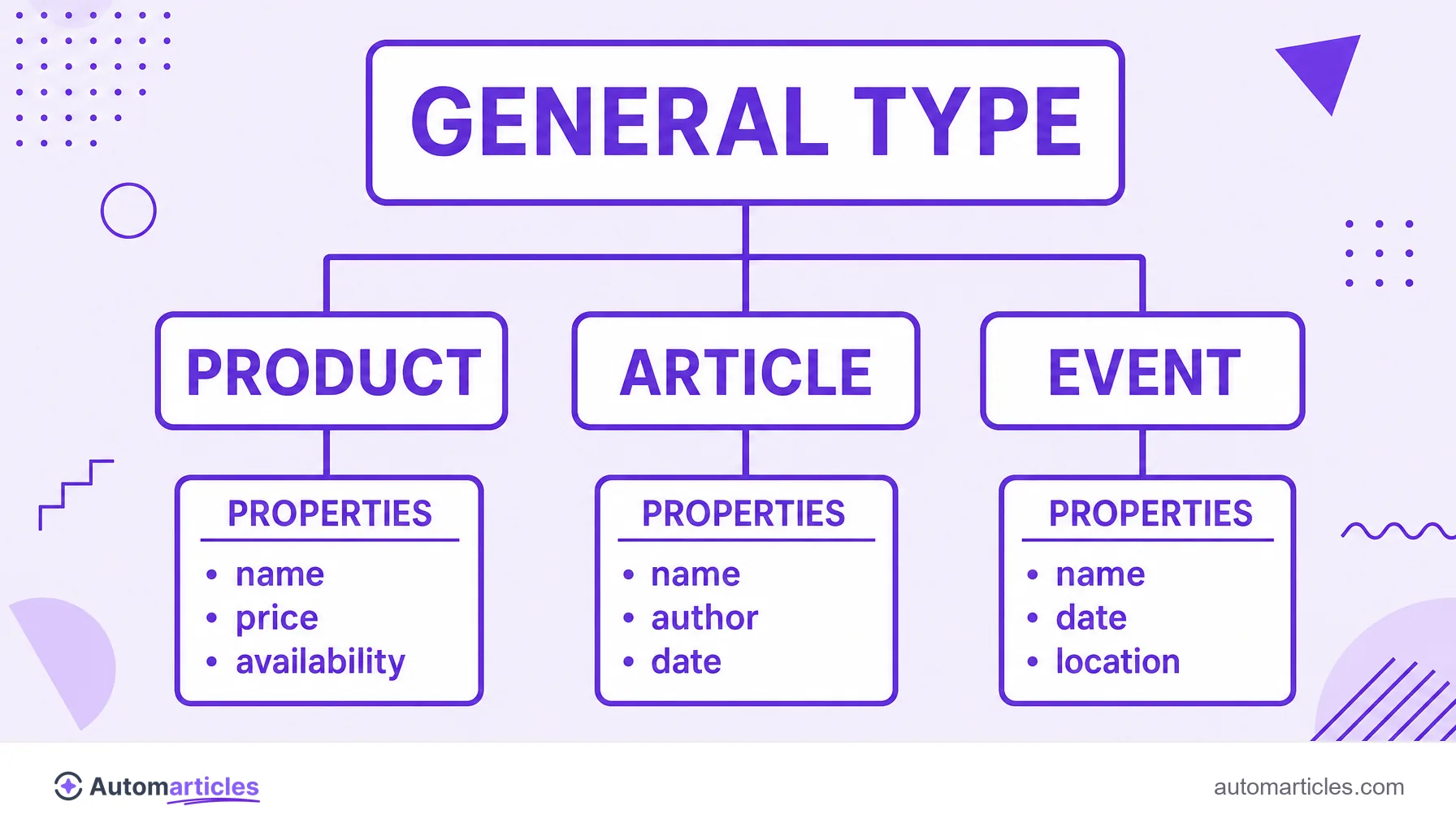
How Schema.org is organized: types and properties
Schema.org works like a hierarchy of types, starting from a generic item and going down to very specific categories. Each type carries properties that describe it. Some of the most used in SEO:
| Type | Describes | Common properties |
|---|---|---|
| Product | A product for sale. | name, price, availability, review. |
| Article | An article or blog post. | headline, author, datePublished. |
| FAQPage | A frequently asked questions page. | question, acceptedAnswer. |
| LocalBusiness | A local business. | address, telephone, openingHours. |
| Event | An event with date and place. | startDate, location, offers. |
The inheritance logic is what makes the vocabulary so flexible: a more specific type, like LocalBusiness, inherits the properties of the broader types above it. This lets you describe anything from a generic entity to a restaurant with a menu and opening hours, always with labels any search engine recognizes.
What Schema.org is for in SEO
Marking up a page with the Schema.org vocabulary brings concrete gains for search visibility:
- Rich results: review stars, prices, FAQ questions and other features that make the result take up more space and grab more attention.
- Entity understanding: the markup feeds the Knowledge Graph, helping Google connect brands, authors and products as real entities.
- Eligibility for special features: some SERP formats only show for pages that describe their content with structured data.
- Better click-through rate: an enriched result tends to attract more clicks than a plain link, an indirect boost to performance.
Adoption of the vocabulary keeps growing. According to the survey by the Web Almanac by HTTP Archive, in 2024 around 49% of mobile home pages already carried some type of structured data, a sign that markup has become a common on-page SEO practice, no longer an edge for a few.

How to use Schema.org in practice
Applying Schema.org does not require rewriting the page, only adding the right markup. A routine that works for most sites:
- Choose the right type: identify what the page represents (a product, an article, a FAQ) and find the matching type in the vocabulary.
- Prefer JSON-LD: the format recommended by Google is JSON-LD, a block of code separate from the visible HTML, easier to maintain.
- Fill it with real data: never mark up a rating or a price that does not exist on the page, at the risk of a penalty for misleading information.
- Validate the markup: use the Rich Results Test and the structured data validator to check for errors or missing fields.
- Monitor performance: follow in Search Console which pages became eligible for rich results and fix the warnings.
Many CMSs and SEO plugins already insert part of this markup automatically, which reduces manual work. Even so, validating before publishing is essential: a single missing required field already blocks the rich result from showing.
Schema.org, AI and the future of structured data
The role of Schema.org has grown with the arrival of AI search. Generative models and assistants use the semantic structure of pages to understand, summarize and cite content with more confidence. A page that describes its entities explicitly is easier to interpret and more likely to become a source.
This brings Schema.org closer to optimization for AI answers. Describing author, organization, product and dates with the standard vocabulary helps both the traditional search engine and the models that assemble the AI Overviews trust your content and display the correct data.
The conclusion is direct: Schema.org has stopped being just a trick to earn little stars on the SERP and has become a layer of meaning the web uses to communicate with machines, whether classic search engines or artificial intelligence assistants.