
What the 410 error (Gone) is and how to use it in SEO
By Tiago CostaUpdated on July 2, 2026
The 410 error (Gone) is the HTTP code that warns that a page was removed for good. In practice, it:
- signals permanent removal, not a temporary failure;
- is more categorical than the 404 (Not Found);
- tends to speed up the page leaving Google's index;
- is meant for content you no longer want indexed.
What the 410 error (Gone) is
The 410 error, whose official name is 410 Gone, is a server response that is part of the HTTP status codes. It says, directly, that the requested resource existed but was removed on purpose and will no longer be available at that address.
Like every code that starts with 4, the 410 is a client side error: the request reached the server, but there is nothing to deliver. The difference is the tone. While other codes only say they did not find the page, the 410 states that it was taken down and will not return.
That detail changes how search engines react. A signal of permanent removal is a much clearer instruction than a temporary absence, and that is why the 410 earned a specific role within technical SEO.
410 error vs 404 error: what is the difference
Both codes point to pages that do not exist, but they communicate different intentions. Worth comparing:
| Code | Message | When to use |
|---|---|---|
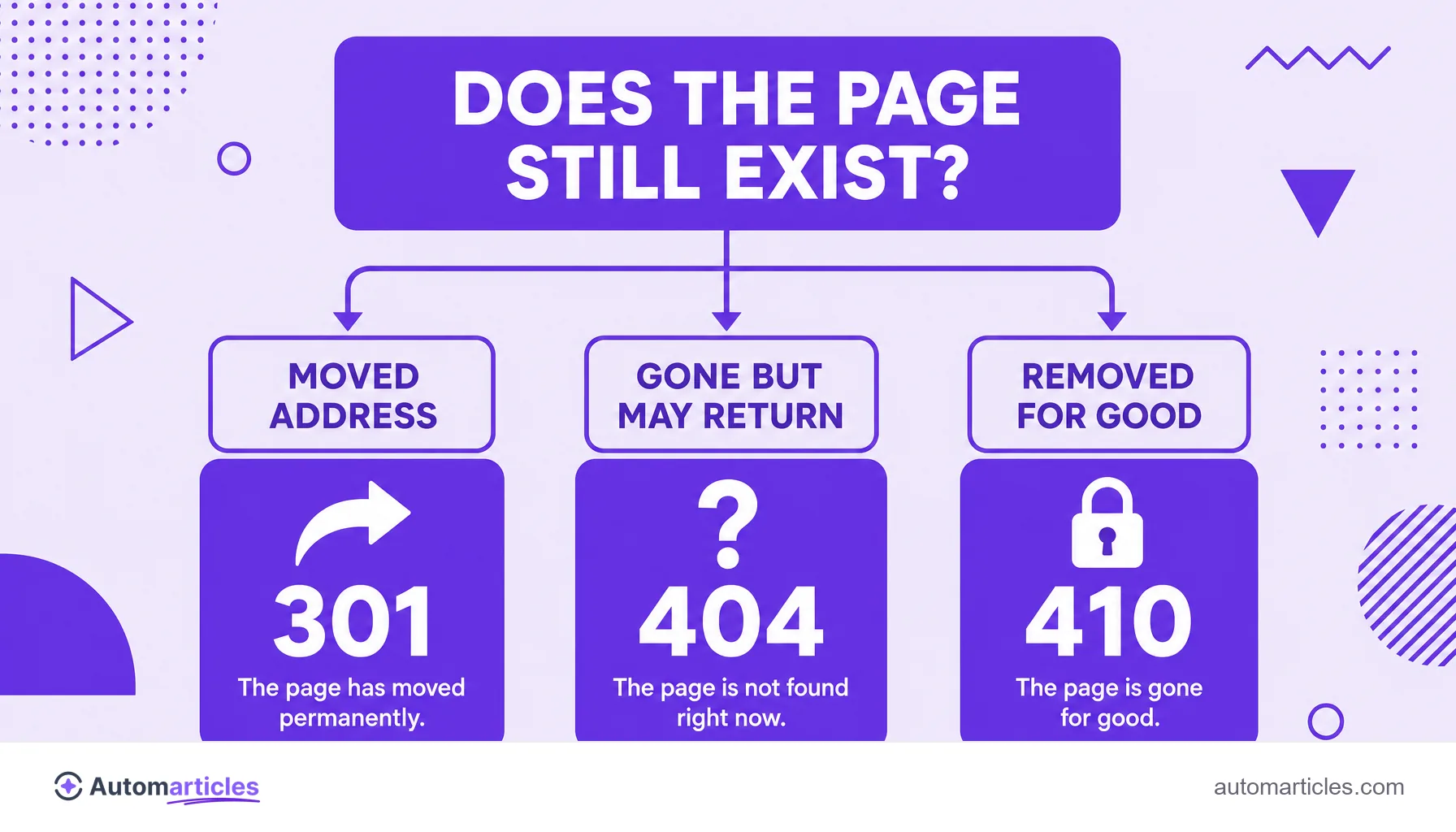
| 404 Not Found | The page was not found now and may come back. | Uncertain removal, mistyped URL or content temporarily down. |
| 410 Gone | The page was removed for good and will not return. | Content deleted on purpose that you want deindexed soon. |
In practice, the 404 error leaves the door ajar: Google may keep trying that address for a while, expecting it to reappear. The 410 closes the door, signaling that there is no point insisting. If the content simply moved, however, neither is the right answer: the ideal is a 301 redirect to the new address.
When to use the 410 status in SEO
The 410 is a surgical tool, not the general rule. Use it when the intention is to remove something for good and speed up its exit from search. The most common cases:
- Discontinued content: product pages that were phased out, ended promotions or past events that will not have a successor.
- Cleaning up low quality pages: thin or duplicate content that you want out of the index to improve the site's health.
- Removing spam or hacked pages: URLs created improperly that need to disappear from search as soon as possible.
Dead pages pile up over time, and at scale. A link rot study by Ahrefs estimated that at least 66.5% of the links analyzed over nine years already pointed to dead pages, which shows the scale at which addresses cease to exist. When that removal is intentional, the 410 communicates it to Google more efficiently than leaving everything as a 404.
How to apply a 410 on your site
Returning a 410 is a server configuration, not something you type into the page content. The path varies with the technology:
- Apache: use a rule in the .htaccess file, such as Redirect gone /old-page, so the address responds with 410.
- Nginx: configure the return 410; directive for the desired location.
- WordPress and other CMSs: redirect plugins usually offer the option to mark a URL as 410 instead of 301 or 404.
After applying it, confirm the code with an HTTP header inspection tool and follow the indexing in Google Search Console to watch the page leave the index. Be careful not to mark as 410 a page that still matters: because the signal is one of definitive removal, reverting it later costs more time than fixing a 404.

410 error in payroll systems and other contexts
If you searched for the 410 error and landed on forums about payroll platforms, tax invoices or government filings, do not get confused: it is another subject. In those systems, the number 410 appears as a rejection code of their own, tied to registration inconsistencies, and has nothing to do with web pages.
This overlap happens because many systems use three digit numbers to classify errors, but the context is different. In this glossary, the 410 error is always the HTTP status of a removed page. For rejections in tax or payroll systems, the solution lies in the rules of that specific platform, not in SEO.
410 error and deindexing on Google
The great advantage of the 410 is the speed with which it takes a page out of search. When Googlebot finds a 410, it understands that the address was taken down on purpose and tends to remove it from the index faster than it would with a 404, which it still tries to revisit as a precaution.
In practice, though, the difference between the two is usually small: Google treats both as signals of a missing page and ends up deindexing both. The 410 just shortens that path a little. That is why the choice between 404 and 410 matters most when you want a quick cleanup and are sure the content will not return. If there is any doubt, the 404 is the safe default.