
Crawl budget: what it is and how to optimize for SEO
By Tiago CostaUpdated on July 2, 2026

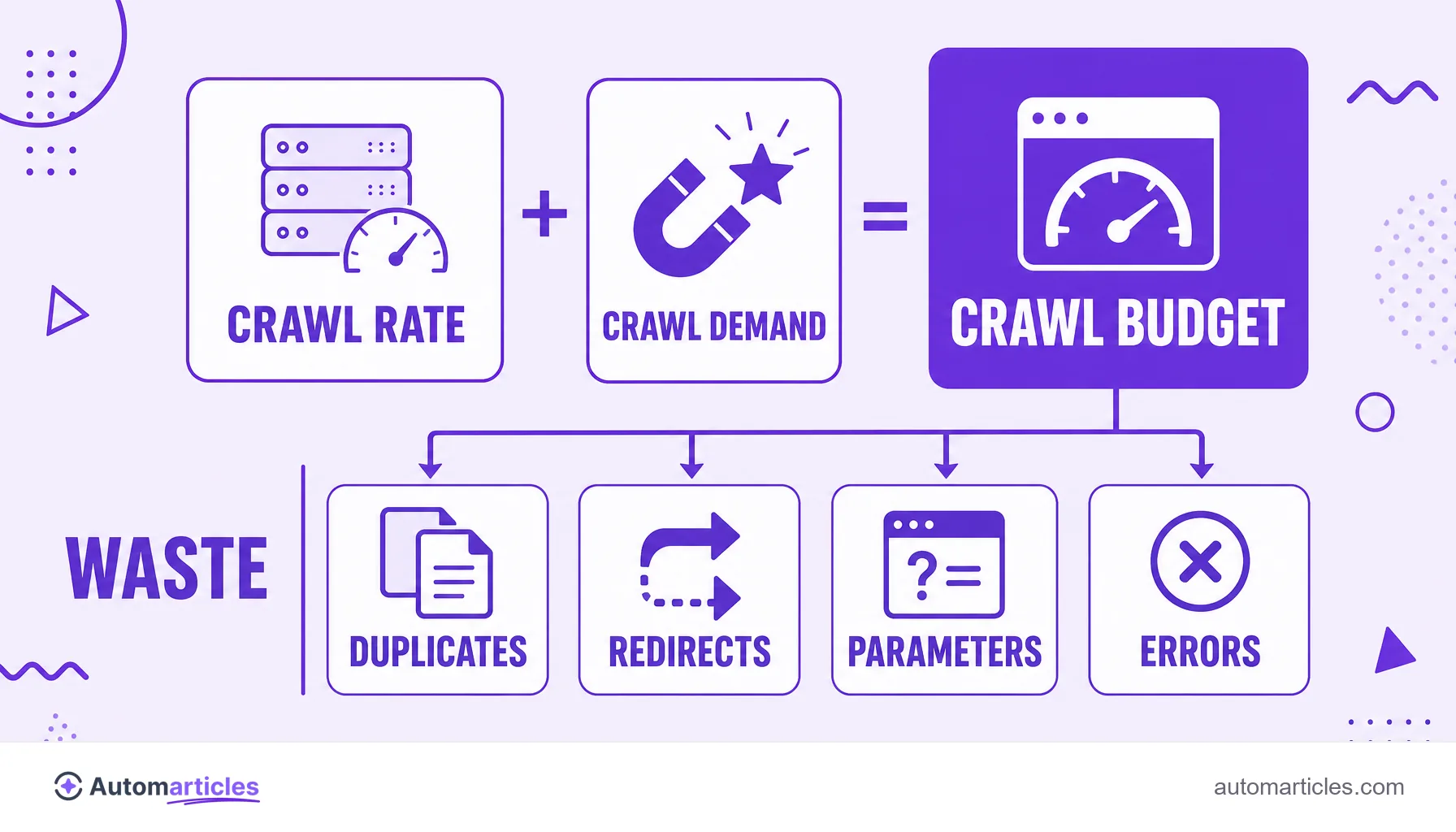
Crawl budget is the number of pages a search engine is willing to crawl on a site in a period. It depends on two factors:
- the crawl rate limit, tied to the speed and health of the server;
- the crawl demand, tied to the popularity and update frequency of the content.
What crawl budget is
Crawl budget is the number of pages a search engine like Google is willing to crawl on a site within a given period. It is the practical limit of attention that the robot, the crawler, dedicates to your domain before moving on to other sites.
This budget is not a fixed number published by Google. It arises from the combination of two forces: how much your server can be visited without slowing down and how much the search engine believes your content deserves to be revisited. On sites with few pages, the robot usually handles everything with room to spare. On sites with tens of thousands of URLs, each crawl becomes a contested resource.
It helps to separate two processes that are often confused: crawling is the robot visiting the page and reading the code, while indexing is deciding to keep that page in the index so it can rank. Crawl budget concerns the first step, which is the gateway to indexing.
How Google sets the crawl budget: crawl rate and crawl demand
Google describes crawl budget as the meeting of two components. Knowing what each one means helps you understand where you can act:
| Component | What it is and what it influences |
|---|---|
| Crawl rate limit | The maximum number of requests the robot makes without overloading the server. A fast, stable site gets the robot more often; a slow server full of errors makes Google ease off. |
| Crawl demand | How much Google wants to visit the site. Popular pages, with links pointing to them, and content that changes frequently spark more demand than idle, ignored pages. |
In practice, crawl budget is the smaller of the two: a powerful server is useless if Google sees no reason to return, and desirable content is useless if the server crashes on every visit. Improving crawling means taking care of both sides at once.
When you need to worry about crawl budget
For most sites, crawl budget is not a bottleneck. The robot crawls everything it needs and still has room left. The math changes when the site grows and starts generating many URLs. Pay attention if your case is one of these:
- large sites, with more than ten thousand relevant pages;
- stores and catalogs that create many URLs from filters and URL parameters;
- news portals and sites that publish or update content all the time;
- domains with many low quality pages competing for the robot's attention.
When crawling becomes a bottleneck, the effect is silent: new pages take a while to show up on Google and updated pages keep displaying the old version. According to Botify, on large, unoptimized sites Google crawls, on average, only around 40% of strategic URLs each month, leaving much of the important content without a robot visit.
What wastes your crawl budget
A good share of crawl budget is lost on pages that should not consume the robot's time. The most common drains are:
- Duplicate content: several URLs with the same content make the robot crawl the same thing again. A well defined canonical URL concentrates the effort on the right version.
- Redirect chains: a redirect chain forces the robot to take several hops to reach the destination, wasting crawling for nothing.
- Infinite parameter URLs: color, size and sorting filters multiply nearly identical addresses.
- Error pages and soft 404s: broken pages or soft 404s consume visits without delivering anything useful.
- Thin content: many thin content pages dilute the robot's attention across addresses nobody searches for.
Each of these wasted visits is one fewer visit for the pages that really matter. Cutting the excess is the first step for the robot to spend the budget where it is worth it.

How to optimize crawl budget in practice
Optimizing crawling is, above all, guiding the robot to the right content and keeping it away from the junk. A good playbook:
- Block the useless in robots.txt: use robots.txt to prevent crawling of areas with no search value, such as carts, filters and internal system pages.
- Keep a clean sitemap: the XML sitemap should list only the URLs you want indexed, with no redirects or blocked pages.
- Fix redirects and errors: shorten redirect chains and remove internal links that point to broken pages.
- Speed up the server: a fast site raises the crawl rate limit; speed is part of technical SEO.
- Strengthen internal links: good internal linking signals to the robot which pages are priorities and helps distribute crawling.
- Consolidate weak content: merge or remove thin pages to concentrate the budget on what drives results.
An important note: blocking a page in robots.txt saves crawling, but it does not remove the page from the index. To remove a page from the results, the path is noindex, not blocking the crawl.
How to monitor crawling in Google Search Console
You do not need to guess how Google treats your site. Google Search Console offers the Crawl stats report, which shows how many requests the robot made per day, the average server response time and which file types and status codes it found.
It pays to watch a few signals: spikes of server errors, too much time spent on irrelevant pages and important pages crawled rarely. To check a specific URL, the URL inspection reveals when Google last crawled that page and whether it was indexed. With this data in hand, you can act with precision instead of in the dark.